
How Fashfx Turns Product Images into Professional Model Photos
A clear product image is often enough to show colour, pattern, and design, but it does not always help shoppers imagine how the item looks when worn. Creating on-model photographs traditionally requires models, photographers, styling, studio space, lighting, editing, and considerable coordination.
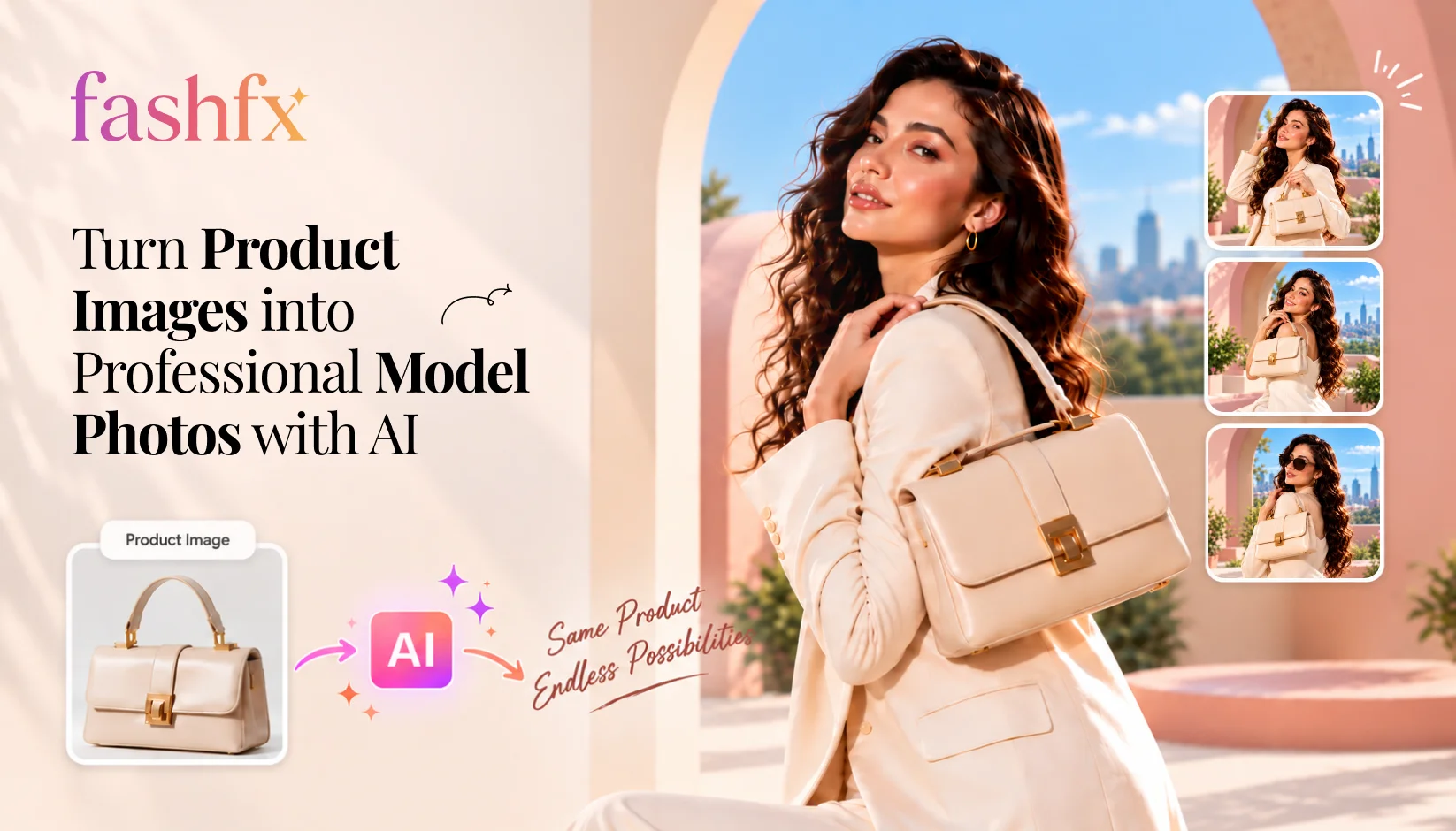
A clear product image is often enough to show colour, pattern, and design, but it does not always help shoppers imagine how the item looks when worn. Creating on-model photographs traditionally requires models, photographers, styling, studio space, lighting, editing, and considerable coordination.
Product to Model AI offers a more flexible approach. It uses a product image and a selected model to generate a new on-model visual digitally. Fashion brands can use this workflow to create additional images for ecommerce listings, catalogs, campaigns, and social content without arranging a separate photoshoot for every visual requirement.
Fashfx brings this process into a fashion-specific workflow. Its Product to Model feature lets users place apparel, footwear, jewellery, or accessories on realistic models and create clean visuals for product presentation and creative exploration. The final output should still be reviewed against the original product before it is published.
What Is Product to Model AI?
Product to Model AI is a visual-generation process that transforms an isolated fashion product image into an image showing the product on a model.
The input may be a flat-lay, cut-out, mannequin, or other clear product photograph. The AI interprets the visible features of the item and generates a new composition in which the product is positioned on a selected model.
Depending on the product and input quality, the system may need to interpret:
- Garment shape and length
- Colour and pattern
- Fabric appearance
- Necklines, sleeves, hems, and closures
- Logos and other branded details
- Placement of footwear, jewellery, or accessories
- The relationship between the product and the model’s pose
Fashfx describes its Product to Model Shot workflow as placing a product image on a selected model to create an on-model visual for catalogs, stores, or campaigns. The platform supports apparel, footwear, jewellery, and accessories across its fashion-visualization tools.
Product to Model AI should be treated as a content-production and visualisation tool. It does not provide an exact physical fit assessment or guarantee that the item will behave identically when manufactured or worn.
How Fashfx Product to Model Works
The Fashfx Product to Model workflow converts existing product photography into model-based fashion content through a few practical stages.
1. Upload a Clear Product Image
The process begins with a photograph of the garment, footwear, jewellery, or accessory. The product should be clearly visible and should not be heavily obscured by props, shadows, or overlapping objects.
A stronger source image gives the AI more usable information about the product’s shape, colour, texture, and design details.
2. Choose a Model
Users can select the model on whom the product will be displayed. Fashfx also provides an AI Model Creation workflow that allows users to explore attributes such as appearance, body type, pose, and presentation style.
The selected model should suit the product category, intended audience, and planned visual use.
3. Generate the Model Shot
Fashfx processes the product and model inputs to create a new composition. The aim is to position the item naturally while retaining important product details.
Fashfx Product to Model Shot preserve the product’s colour, texture, shape, pattern, branding, and key design features.
4. Compare the Result with the Product
Every generated image needs a visual review. Compare the result with the source photograph and check:
- Colour accuracy
- Print and pattern placement
- Product proportions
- Sleeve, neckline, and hem details
- Buttons, zips, pockets, and trims
- Logos and typography
- Jewelry or accessory placement
- Body and hand anatomy
- Background and lighting consistency
AI generates a new image rather than reproducing the source product pixel for pixel. A result that looks convincing may still contain a product-detail error.
5. Generate and Select Variations
Teams can explore alternative models, poses, styling directions, or compositions and then select the versions that best represent the product.
This is particularly useful when one product needs different content for a product page, catalog, social post, advertisement, or early campaign concept.
How Can AI Turn Product Images into Model Photos?
AI turns a product image into a model photo by analyzing visible product information and synthesizing a new image in which the item appears on a person.
The system does not simply paste the product over the model. It must visually reconcile the product with the body, pose, perspective, lighting, and surrounding composition. Parts of the product may need to be reshaped or reconstructed to appear naturally worn.
A simplified version of the process is:
- The system identifies the product and its visible design features.
- It analyses the selected model’s body position and pose.
- It estimates how the item should be positioned in the new composition.
- It generates the on-model appearance, including folds, shadows, and partially hidden areas.
- It blends the product, model, lighting, and background into one image.
Because some information may not be visible in the source photograph, the generated result can include inferred details. Human review is therefore essential, especially for ecommerce fashion photography where the image represents a product offered for sale.
Read More: How AI Is Transforming the Fashion Industry in 2026
What Makes a Good Product Input?
The quality of AI model photos begins with the quality of the source image. A product photograph does not need to be part of a large editorial shoot, but it should communicate the item clearly.
For stronger results:
- Use a sharp, well-lit image.
- Show the complete product where possible.
- Avoid severe wrinkles that hide construction details.
- Keep patterns, logos, and trims visible.
- Use a simple or clean background.
- Avoid strong colour casts from surrounding light.
- Do not cover the item with text, stickers, or watermarks.
- Use the highest practical image resolution accepted by the platform.
- Provide additional angles when the workflow allows and when important details are hidden.
A front-facing image may communicate the general design, but it cannot show every detail on the back or sides. We cannot confirm that the AI will reproduce details that are absent or unclear in the uploaded image.
Where Can Fashion Teams Use AI Model Photos?
Ecommerce Product Pages
A Product Image to Model workflow can supplement flat product photographs with on-model context. Shoppers can see the item within a complete composition instead of viewing only an isolated cut-out.
Generated images should be checked carefully before being used as product-representation images.
Digital Catalogs and Lookbooks
Brands can develop a more consistent visual direction across multiple products. Similar model presentation, framing, and styling can help make a catalog easier to browse.
Social Media Content
One product image can become the basis for multiple visual directions for posts, launch announcements, and short-form campaign content.
Advertising Concepts
Marketing teams can compare models, layouts, and styling ideas before committing to a larger production direction. The selected model and any generated people should be used in accordance with the platform’s terms and applicable advertising requirements.
Marketplace Listings
AI model photos may help create additional contextual views. However, every marketplace has its own image and AI-content rules. Brands should verify the current requirements of the marketplace before uploading generated content.
Campaign Planning
Creative teams can use generated model shots as visual references during mood-board creation, internal reviews, or pre-production. Fashfx also provides workflows for turning product or model images into campaign visuals and short fashion videos.
Benefits of AI Model Generation
Fewer Repeat Shoots
When a brand already has a usable product photograph, it can explore additional model visuals without organising a new shoot for every variation.
Faster Creative Exploration
Teams can compare models, poses, and visual directions earlier in the content process. This can make internal discussions more concrete because stakeholders are reviewing images rather than written descriptions alone.
More Content from Existing Assets
The same source product image can support model shots, catalog concepts, campaign variations, and other AI fashion content.
Easier Catalog Expansion
An ecommerce team can develop additional visual options as its product range grows, subject to input quality, generation capacity, and manual quality checks.
Greater Model Variety
Brands can explore different model presentations for collections, audiences, and creative directions. This does not remove the need to check whether the generated representation is suitable, respectful, and consistent with the brand.
Lower Production Requirements
Product to Model AI can reduce reliance on some recurring production elements, such as additional model bookings, studio sessions, travel, and reshoots.
Fashion Product Photography vs Product to Model AI
| Factor | Traditional model photography | Product to Model AI |
|---|---|---|
| Starting point | Physical product and planned shoot | Existing product image |
| Model requirement | Model booking required | Selected or AI-created model |
| Studio requirement | Often required | Digital workflow |
| Variations | May require more shoot time | Can be generated digitally |
| Product accuracy | Captures the physical item | Must be checked against the source |
| Physical fit | Shows the item on a real person | Provides a visual interpretation |
| Best suited for | Hero campaigns, precise fit and physical documentation | Ecommerce concepts, catalogs, variations and scalable content |
| Quality control | Photography and retouching review | Input, generation and product-accuracy review |
The two workflows are not mutually exclusive. A fashion brand may use professional photography for major campaign assets and Product to Model AI for selected catalog, ecommerce, localization, or creative-variation needs.
Does Product to Model AI Replace Fashion Photography?
Product to Model AI does not replace every form of AI fashion photography or traditional production.
A physical photoshoot remains valuable when a brand need:
- Exact documentation of fit and construction
- Authentic fabric movement
- Detailed close-up photography
- A specific location or physical set
- Celebrity, influencer, or recognisable-model content
- Complex interaction between several people or objects
- High-concept editorial storytelling
AI product photography is more useful when a team needs to create visual alternatives from existing assets, reduce repeat production, develop early concepts, or expand day-to-day content.
The most practical approach may be hybrid: capture accurate source photography and use AI to extend those assets into additional model and campaign visuals.
How Fashfx Supports Product-to-Model Content Creation
Fashfx is designed around fashion-specific inputs and outputs rather than general image generation. Its Product to Model workflow supports apparel, footwear, and accessories and is intended for catalog, styling, store, and campaign visuals.
Fashion teams can use it to:
- Turn isolated product images into on-model compositions
- Explore different model presentations
- Create catalog and ecommerce visual options
- Develop early campaign directions
- Extend product images into other fashion-content workflows
- Create short product videos from static fashion assets
The generated image should not be approved solely because it looks realistic. Product accuracy remains the deciding factor. Review the output against the original item before it reaches customers.
Start Creating with FashFX
Turn early fashion ideas into realistic garment visuals ready for review and collection planning.
Get StartedTable of Contents
Frequently
Asked Questions
Have questions about How Fashfx Turns Product Images into Professional Model Photos? We answer them here
Product to Model in Fashfx is a workflow that places an uploaded fashion product on a selected model. It can create on-model images for catalogs, online stores, styling presentations, and campaigns. Fashfx publicly documents support for apparel, footwear, and accessories in this workflow.

Turn Product Images into On-Model Fashion Visuals
Fashfx helps fashion brands, designers, retailers, ecommerce teams, and creative agencies transform existing product images into realistic model shots.
Create Model Photos with Fashfx